Export Garmin Data: FIT Files, Sleep and HRV
Updated Sep 28, 2026
Garmin Connect is the deepest fitness activity archive of any consumer platform. A Garmin watch logs GPS, heart rate, cadence, elevation, temperature, power, sleep stages, HRV, Body Battery, stress, and respiration. Typically going back to the day you paired the watch. If you are moving to Garmin from Fitbit ahead of the Google sunset, or just want a clean backup, this guide walks through Garmin's GDPR-compliant data export and what to do with the files you get back.
Export at a glance
Archive file map
Top-level structure of the export. Each entry is a file or directory with its format badge and what it contains.
DI_CONNECT/JSONDI-Connect-Fitness/summarizedActivities.jsonJSONDI-Connect-Fitness/*.fitFITDI-Connect-Fitness/Training/JSONDI-Connect-Wellness/summarizedSleepData.jsonJSONDI-Connect-Wellness/Monitoring/JSONDI-Connect-Wellness/BodyComposition/JSONWhat Garmin Connect records about you
- Every activity: runs, rides, swims, hikes, walks, strength, yoga, with full per-second GPS, heart rate, cadence, elevation, temperature, and (where supported) power
- Sleep stages: light, deep, REM, awake. With HRV measured during sleep, plus pulse-ox overnight where your watch supports it
- Body Battery: Garmin's proprietary energy score (0–100) calculated from HRV, stress, sleep, and activity
- Stress score: continuous HRV-derived stress readings throughout the day
- HRV status: overnight HRV trend with a 7-day baseline (supported watches)
- Heart rate: continuous readings throughout the day and during workouts; intraday and resting-HR trends
- Steps, floors, intensity minutes, and Move IQ auto-classified activity counts
- Body composition: weight, body fat %, BMI, muscle mass, bone mass (when paired with a Garmin Index smart scale or entered manually)
- Hydration tracking (manual entry on most watches)
- Workouts: strength sets with reps and weight, yoga/ HIIT/ pilates sessions
- Workout plans, training calendars, and race predictions
- Account metadata: email, registration date, devices paired, order history, connected apps
The export can take up to 30 days: request now
- Garmin's bulk export is asynchronous. Submit, then wait for an email
- Typical delivery is 24–48 hours, but large accounts (10+ years, multiple watches, weight history) can take up to 30 days
- There is no incremental or "last 31 days" option. Garmin only ships a full account archive
- You can keep using Garmin Connect normally while the export is being prepared
- The download link in the email expires: save the ZIP promptly when it arrives
Native export: step by step
- Open garmin.com/account/datamanagement/ in a desktop browser.
- Sign in with your Garmin account (the one your watch is paired to).
- Under the "Export Your Data" section, click "Request Data Export".
- Confirm the email address where you want the archive delivered, then click "Submit Request".
- Wait for the email: typically within 24–48 hours, can take up to 30 days.
- Click the download link in the email before it expires.
- Save the ZIP file in a known location and verify the .FIT files open before deleting the email.
Exporting one activity from the app
The bulk archive above is web-only, and it can run to 30 days. If you want a single activity and do not want to wait on that, the Garmin Connect app can do it from your phone.
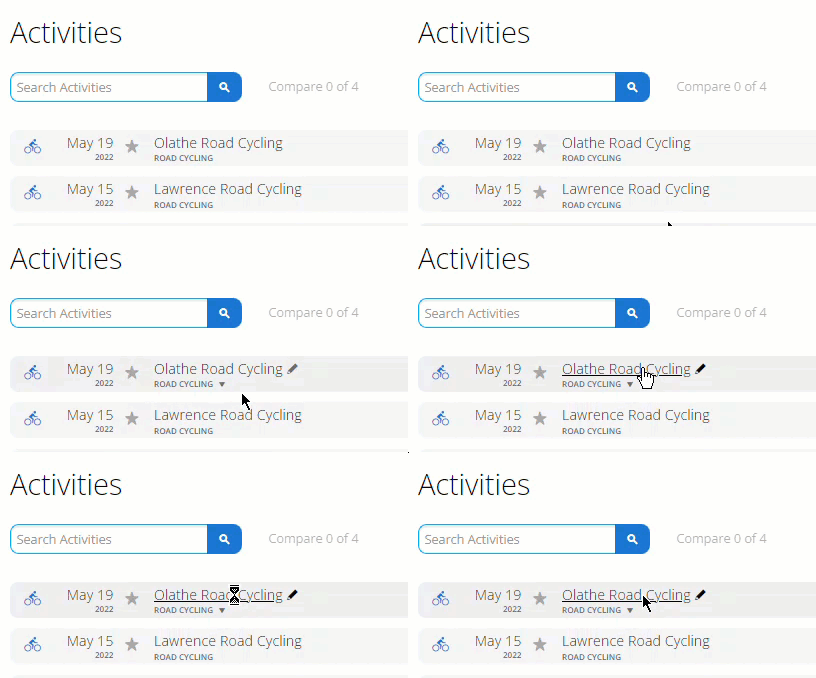
- Open Garmin Connect and go to Activities.
- Pick the activity from the list. The screenshot below is that list, including the search box Garmin ships it with.
- Open the activity, then use the settings gear icon in the top right corner.
- Follow the export options from there. Garmin changes this menu between device generations, so go by what your own screen offers rather than the labels a guide gives you.
What is inside the archive
Garmin's bulk archive is split across three main product folders. DI_CONNECT, DI-Connect-Fitness, and DI-Connect-Wellness. Each containing JSON summaries and, for activities, the raw FIT files. The exact structure has changed as Garmin has reorganised their data products, so the inventory below is what real users report seeing in 2026; it may differ slightly for older exports.
- DI_CONNECT/: account-level metadata: userProfile.json (account, paired devices, connected services), and the device, app, and settings records Garmin links to your account
- DI-Connect-Fitness/: your activity archive: summarizedActivities.json with one entry per recorded activity (date, sport, distance, duration, HR summary) plus a set of ZIPs containing the raw .fit files for each activity, named by upload time
- DI-Connect-Wellness/: daily health and recovery data: steps, sleep (summarizedSleepData.json with stages), HRV, Body Battery, stress, intensity minutes, and monitoring series (minute-level steps, HR, stress)
- Body composition: weight, body fat, BMI, and other Index-scale measurements under DI-Connect-Wellness/
- Order history: Garmin store orders linked to your account (DI_CONNECT/)
- Training calendars: workout plans and scheduled sessions (DI-Connect-Fitness/)
- For the specific filename inside each folder, run `unzip -l` on the top-level archive. Garmin ships a manifest that lists every file in the request
Inside an activity FIT file
- FIT is Garmin's native format (Flexible and Interoperable Data Transfer) and is the lingua franca of fitness data
- Each FIT file is a single binary record with full time-series: GPS every 1 second, HR every 1 second, cadence, elevation, temperature, power (where supported)
- FIT files open natively in Strava, TrainingPeaks, COROS, Wahoo, Runalyze, GoldenCheetah, and most training software. Drag-and-drop import
- A FIT file is also self-describing: it carries the device model, firmware version, sport type, and field definitions, so you can audit exactly what the watch was recording
- Converting FIT to CSV is straightforward with free tools (FitCSV, fit-to-csv, Garmin's own FIT SDK). Useful for spreadsheet analysis
Sleep, Body Battery, HRV. The metrics Fitbit refugees care most about
- Sleep stages are exported per night with start/end times and durations in each stage. Directly comparable to <a href="/guides/fitbit-data-export">Fitbit's Sleep/</a> export
- Body Battery is a Garmin-proprietary score (0–100) measuring energy available; not directly comparable to Fitbit's Daily Readiness, but trends over weeks are meaningful
- HRV status reads nightly HRV and compares it to your rolling 7-day baseline; the export includes both the rmssd value and the status label (Balanced / Unbalanced / Low / etc.)
- Stress score is continuous, calculated from HRV throughout the day. Values above ~70 indicate physiological stress, below ~30 indicate recovery
- Pulse-ox overnight (SpO2) is included for watches that support it (most Fenix, Forerunner 965, etc.). Useful as a longitudinal trend
Combining Garmin with Strava, Fitbit, MyFitnessPal
- If you also use Strava, Garmin FIT files import directly via Strava's "Upload from computer". Duplicate activities get auto-merged by time and route
- If you are migrating from Fitbit, see our <a href="/guides/fitbit-to-garmin">Fitbit → Garmin transfer guide</a> for the full workflow
- MyFitnessPal nutrition exports (<a href="/guides/how-to-export-myfitnesspal-data">how to export MFP</a>) join Garmin activities by date for combined training+nutrition timelines
- For serious analysis, load Garmin FIT files and MFP CSVs into the same pandas / R notebook keyed by date
- Strava bulk exports (<a href="/guides/how-to-export-strava-data">how to export Strava</a>) are also GPX / FIT, so any Garmin FIT analysis tool works on Strava exports too
- For a step-by-step Strava → Garmin walkthrough, see our <a href="/guides/strava-to-garmin">Strava → Garmin transfer guide</a>
- Apple Health workouts can be exported as TCX and imported to Garmin. See our <a href="/guides/apple-health-to-garmin">Apple Health → Garmin guide</a> for the encrypted-backup workflow
Where to store it
- Store in a folder named garmin-2026-08
- Garmin archives are large: multi-GB for long-term athletes. Keep the activity FIT files intact; the summarizedActivities.json under DI-Connect-Fitness/ is small and easy to revisit for a quick-look summary
- Off-site encrypted copy in ProtonDrive (ProtonDrive) or pCloud (pCloud)
- Local encrypted copy on an external SSD (external SSD) using Cryptomator
- If you want a quick-look summary without unpacking the archive, import the FIT files into Strava or Runalyze first. Both cache the data and let you browse on phone
Quick version
If you want the short checklist instead of the full guide, use the service page.
Related guides
- Getting Started with Digital Takeout Day (2026)
- Fitbit to Garmin: What Transfers and What Not
- Export Strava Data: GPS Files, Heart Rate & Activity History (2026)
- Strava to Garmin: What Transfers and What Not
- Apple Health to Garmin: What Transfers
- Back Up Your Data Exports: Storage, Encryption & Organisation (2026)
FAQ
Does Garmin delete the data after I export?
No: exporting creates a copy. Garmin keeps your data unless you separately request account deletion.
How long does Garmin's bulk export take?
Typically 24–48 hours; very large accounts (10+ years, multiple watches) can take up to 30 days. You can keep using Garmin Connect normally while the export is being prepared.
What are FIT files and how are they different from CSV?
FIT is Garmin's native binary format. Full time-series data, self-describing, smaller than equivalent CSV, and supported natively by Strava, TrainingPeaks, COROS, Wahoo, Runalyze, and GoldenCheetah. CSV is human-readable but loses time-series resolution.
Can I export from the Garmin Connect mobile app?
No: Garmin's full account archive is only available via the web at garmin.com/account/datamanagement/. The mobile app can export individual activities as FIT, but not the full archive.
Does the export include sleep data?
Yes: per-night sleep stages (light / deep / REM / awake) with durations and start/end times, plus nightly HRV, pulse-ox overnight (where supported), Body Battery end-of-day, and stress score.
Is Garmin the right Fitbit alternative if Google sunsets Fitbit?
For most users, yes. Garmin has the deepest device ecosystem (watches, scales, bike computers, handhelds), the longest battery life, and the most complete export format. Migrating history from Fitbit to Garmin is one-way but well documented; see our Fitbit → Garmin transfer guide.
Can I move Garmin data into Strava after export?
Yes: drag-and-drop the FIT files into Strava's "Upload from computer" page. Activities are matched by route and time; duplicates from the live sync auto-merge.
Is Garmin's export GDPR-compliant and complete?
Yes: Garmin's bulk archive is the same data subject-access-request response they give EU users under GDPR, and includes everything Garmin stores about you (profile, devices, activities, sleep, body composition, order history). It is the most complete account snapshot Garmin offers.
Last verified: Sep 3, 2026. Steps checked against www.garmin.com. Report an outdated step →