
Deezer
Updated Oct 13, 2026
Deezer is a music streaming service, one of the three biggest in Europe and much smaller everywhere else, with a catalogue that leans towards dance, electronic and francophone artists the other services do not always carry. Getting your data out takes two emails. The first contains a session code you have to enter back on the site before anything starts, the second arrives up to a week later with a link that dies 30 days after it lands. The listening history is the part worth having.
What you'll get
Before you start
- Log in at deezer.com on a computer. The request is on the website; there is no app route for it.
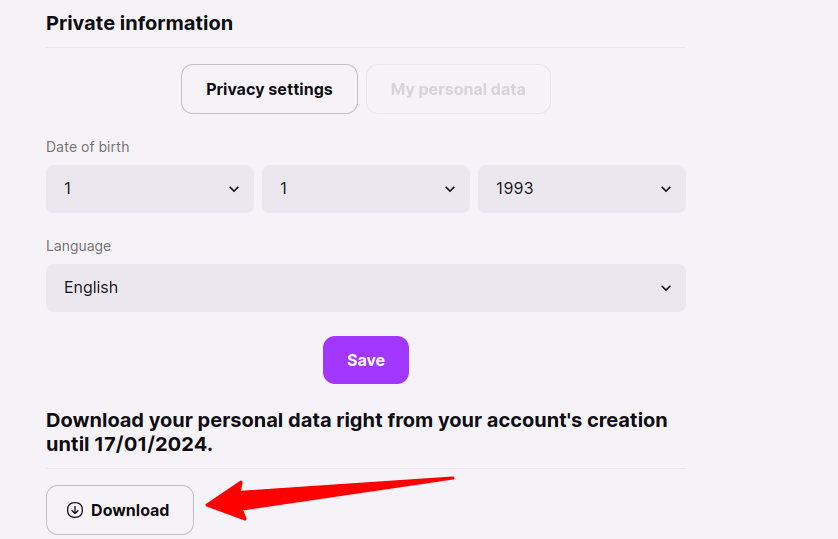
- Open your private Information section. It is in the account area, not the settings menus you would guess at.
- Click the button labelled Personal Data.
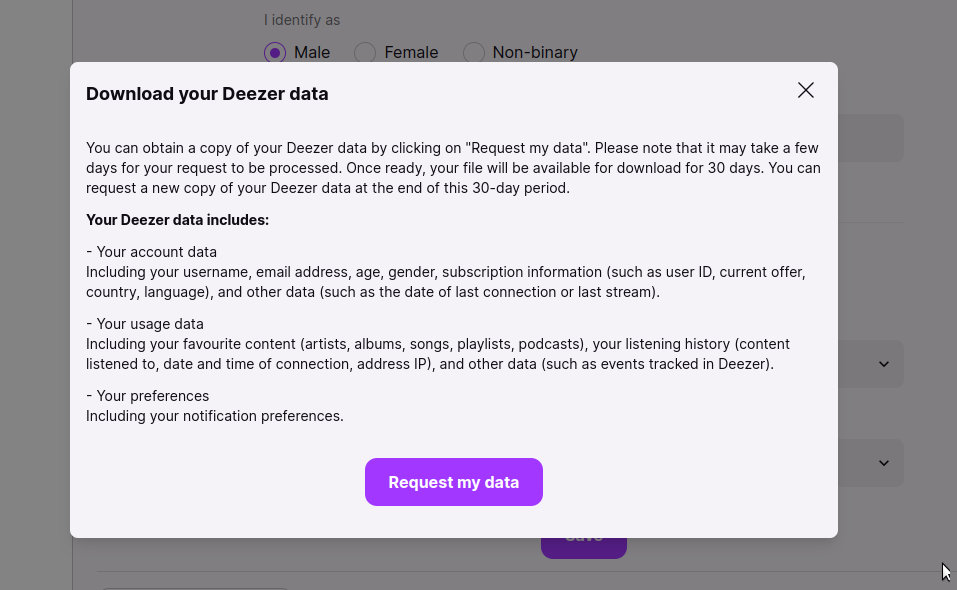
- A pop-up appears listing what the export will contain. Read it, because Deezer does not document this anywhere else, then click "Request my data".
How to download
- Check your email. Deezer sends a secure session code.
- Enter that code on the Deezer site. Until you do, the request has not actually started and nothing will arrive.
- You should get a confirmation email shortly after.
- Wait. Deezer says seven days. The in-app pop-up is vaguer and says it may take a few days, so treat a week as the working figure.
- When the download email lands, get the files. The link stays live for 30 days, after which the only way back is to request the whole thing again.
Pro tip
Deezer emails you a session code that you have to enter back on the site before anything at all happens. Miss that email and the request sits there doing nothing, with nothing to remind you it is there. It is also the only confirmation you get that the request was received at all.
After the download
- What is in it, per Deezer's own pop-up: your account data (username, email, age, gender, subscription information including user ID, current offer, country and language, plus last connection or last stream date), your usage data (favourite artists, albums, songs, playlists and podcasts, your listening history with what you played and when, and your IP address), and your preferences (notification settings).
- The listening history is the reason to bother. It is the only place your play history exists outside Deezer, and it is the part Spotify users most often wish they had exported sooner.
- Your IP address comes attached to that history. That makes this one of the more sensitive archives on this site, so keep it somewhere encrypted rather than in a synced folder.
- Deezer does not publish a file format or a manifest anywhere in its help centre. Nobody has found one. Unzip it and look at what is actually there, which takes ten seconds and beats planning around a file list you read somewhere.
- If you let the 30 days lapse the archive is simply gone and you start the clock again from zero. There is no way to extend it.
- Do this twice a year, the same as any other streaming service. The history keeps growing in between and there is no version of it you control until you ask for one.
- Not sure where to store your export? See our backup guide.